
Now when backing up to the cloud, you can easily store a copy of your data offsite, allowing you to take advantage of cost-effective storage options.
Microsoft states,
“In SQL Server 2016, we have added significant enhancements to our backup technologies, making it easy to leverage the cloud for backups.”
Backup to URL
SQL Server Backup to URL allows you to easily backup directly to Microsoft Azure Blob storage, removing the requirement to manage hardware for backups, and at the same time it also gives you the benefit of storing all your backups in flexible, reliable and virtually bottomless storage.
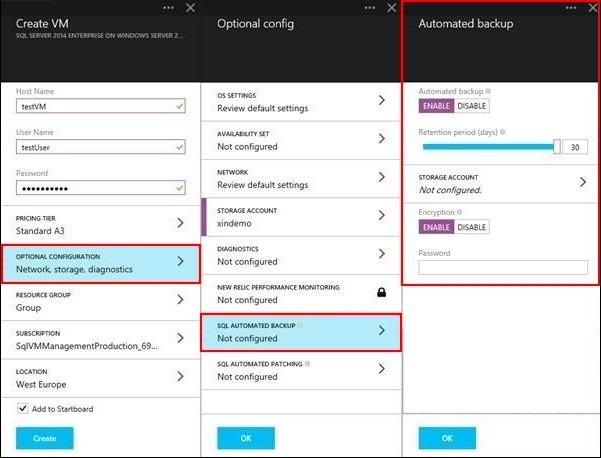
Image Source: blogs.technet.microsoft
In SQL Server 2016, Microsoft now offers support for the use of block blobs in order to make this tool more helpful. They are as stated below:
- Backup striping can be used to support backup sizes of up to 12 TB.
- Faster backup and restore when using backup striping.
- You can use shared access signatures to create SQL backup credentials that limit SQL Server’s access to a specific container, rather than the whole storage account.
Managed Backup
Currently, Microsoft offers automated backups for multiple databases which is required for developing backup strategies, writing custom code and also scheduling backups. By using SQL Server Managed Backup to Azure, you can now easily create a backup plan by specifying the retention period and Microsoft Azure storage location. The SQL Server Managed Backup to Windows Azure does the rest – scheduling, performing and maintaining the backups.
In SQL Server 2016, Microsoft has enhanced the following features, in order to make it even easier to back-up your databases.
- Full, bulk-logged and simple recovery models are all supported.
- System databases can be configured for backups.
- Backup striping can be used to support backup sizes of up to 12 TB.
- Customer backup schedules can be specified to ensure your backups are created when it is best for your workload.
- Getting started with SQL Server 2016 Managed Backup is simple with our configuration guide.
- You can also configure Managed Backup on a SQL Server Azure Virtual Machine with the Auto Backup feature, all you need to do is simply follow the screenshot below while creating your virtual machine.

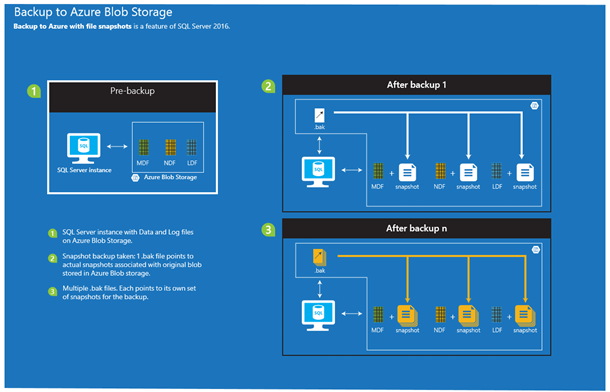 Image Source: blogs.technet.microsoft